Skytech - Microsoft Entra ID vs Traditional Active Directory – What’s the Difference?
Businesses today depend significantly on digital systems for handling staff members, applications, devices, and sensitive business data. User access management can get more complex as organizations expand. Employees using laptop, tablet, and mobile devices access company systems from offices, homes, airports, and client locations. This change has transformed the way companies approach user authentication and security.
Businesses have relied on traditional Active Directory environments to control users and devices within office networks for years. It worked well when the majority of employees were in one location and had their own company provided computers with internal servers. Business operations, however, have undergone major changes over the years.
Today, businesses demand flexible access to cloud applications, remote systems and hybrid work environments. Businesses need stronger identity protection without disrupting employee productivity. That’s where Azure Active Directory has been a vital solution for contemporary firms.
Even today, many business owners are unsure whether they should rely on Active Directory or a different identity platform, such as a cloud-based service. Both systems help manage users and permissions, but they serve different organizational needs.
At Skytech, we help businesses understand modern identity systems and implement secure access solutions suited for today’s work environments. In this blog, we will look at the major differences between the classic Active Directory and newer cloud identity platforms, in simple terms, and with easy-to-understand explanations.
What is the Traditional Active Directory?
Traditional Active Directory was introduced by Microsoft many years ago as a directory service for business environments that are based on the Windows operating system. It primarily focuses on on-premise infrastructure that includes servers, devices and applications running within a company’s own network.
Administrators can establish user accounts, control passwords, give permissions and control access to company resources. Employees log in to office computers using accounts managed within the organization’s local network.
Active Directory is suitable for companies that primarily have physical office spaces. Devices connecting to the network can be monitored and policies can be enforced inside the network.
Some common functions include:
- Login credentials for employees’ accounts.
- Controlling access to shared folders
- Application of security policies for groups
- Managing office computers and printers
- Company network authentication of users
- Assigning Users to Departments & Groups
Traditional systems are good for what they were designed for, but not for the massive distributed work and cloud applications.
Understanding Microsoft Entra ID
Microsoft Entra ID was formerly called Azure Active Directory. Microsoft later rebranded the platform, but it continues to focus mainly on identity security and access for cloud environments.
Microsoft Entra ID is a cloud-based identity provider, unlike the traditional Active Directory. This means that businesses don’t have to rely on physical office servers to manage user authentication and access.
Employees can safely access business applications on various devices and locations, and administrators maintain control over permissions and security settings.
The platform supports cloud applications like SaaS tools, cloud-based remote business systems, and Microsoft 365. It also offers enhanced identity protection capabilities aimed at today’s threats.
Azure Active Directory services can help organizations enhance user authentication and mitigate the constraints of legacy office-based authentication.
Main Difference Between Both Systems
The biggest difference comes down to where and how identity management happens.
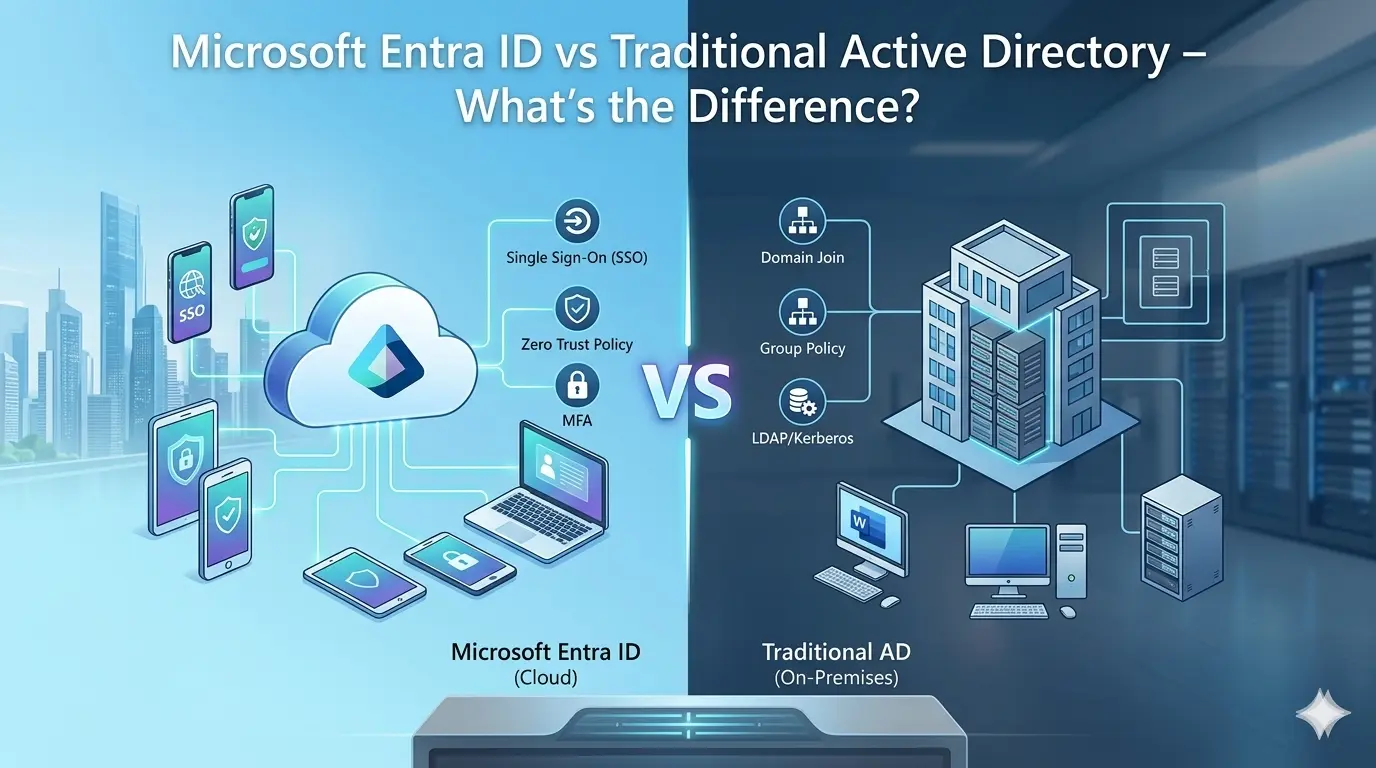
Traditional Active Directory works primarily within a company’s network, with internal servers. Microsoft Entra ID operates on cloud infrastructure and is better suited for remote access.
Traditional systems are office oriented. Cloud-based identity platforms are built for companies with employees who work remotely, hybrid workforces, and cloud applications.
There are a bunch of significant distinctions:
- Infrastructure: Traditional Active Directory relies on physical domain controllers within the business environment. Microsoft Entra ID runs on Microsoft’s cloud platform.
- Device Access: Older systems are primarily used for office devices. Cloud-based platforms are more flexible with laptops, mobile devices, tablets and remote endpoints.
- Authentication: Typical systems typically use passwords and network access to the office. Modern cloud systems offer stronger authentication methods, such as:
- Multi-factor authentication
- Conditional access rules
- Risk-based sign-in protection
- Passwordless authentication
- Identity monitoring tools
- Scalability: In traditional environments, businesses need to maintain servers, upgrades, backups, and hardware. The cloud-based identity platform has the advantage that it grows easily with businesses.
Why Businesses are Moving Toward Cloud Identity Platforms
The job market is very different these days. Employees anticipate applications that are available to them in almost any location. Additionally, cloud-based software is being used more than local software. Industries are now facing a greater need for cloud identity management as a result of this transition.
Businesses seek easier access control management solutions that don’t solely rely on office infrastructure. Cloud-based identity platforms can assist companies to retain security while enabling remote productivity.
Major factors driving the change of business are:
- Improved remote working facilities.
- Simplified cloud application management.
- Simpler cloud application handling.
- Improved security monitoring
- Less reliance on physical servers.
- Faster scalability
- Simplified user management
- Better protection against new cyber threats.
Furthermore, there is centralized access control that is available to organizations. Administrators have the ability to control permissions for multiple applications through one place.
Security Advantages of Microsoft Entra ID
The risks of identity-based attacks have been growing enormously in the last few years. Safety is one of the main concerns in a business, particularly when it comes to unauthorized access, password theft, and phishing attempts.
These risks are mitigated with modern identity platforms equipped with robust authentication mechanisms and intelligent monitoring tools.
As attackers typically prioritize credentials of employees, security around identity management has become a critical matter. After getting access to the credentials, it is possible for cybercriminals to gain access to sensitive company information or internal systems.
Microsoft Entra ID offers several advanced capabilities to enhance security for businesses.
Multi-Factor Authentication
Users may need additional verification beyond passwords. This minimises the chances of unauthorised access even if passwords become compromised.
Conditional Access
Businesses can create rules based on:
- User location
- Device health
- Login risk
- Application sensitivity
- Network conditions
This enables better access management.
Identity Protection
If suspicious login activity appears, it may alert you or automatically restrict access.
Single Sign-On
Employees can access multiple approved applications using a single login, rather than having a different account for each application.
This enhances the convenience and security.
Role of Identity and Access Management
Today’s business needs more rigorous access control to company systems and information. Identity and access management (IAM) comes into play there.
IAM systems help organizations verify users, manage permissions, and protect sensitive resources from unauthorized access.
In the absence of proper access controls, businesses can be vulnerable to the disclosure of customer records, their financial systems, internal applications, and confidential data.
Effective identity management can benefit organisations by:
- Improve security visibility
- Minimize the risk of unauthorized access
- Simplify employee onboarding
- Remove access for former employees quickly
- Support compliance requirements
- Securely control access to third parties.
User permissions can also be centrally managed, providing businesses with improved operational efficiency as opposed to managing permissions manually in various systems.
Supporting Hybrid IT Environments
Some companies are still utilizing some in-house systems and are also subscribing to cloud solutions. This results in hybrid IT environments that require local and cloud identity management.
Not all organizations can migrate to the cloud at once. Some systems may need to remain within a company’s infrastructure for operational or compliance reasons. Azure AD solutions support hybrid environments, enabling businesses to integrate their on-premises systems with Azure identity services. This is an effective way for companies to upgrade over time rather than replacing everything all at once.
Hybrid identity models are also useful for companies that have complex business operations or industry-specific needs.
Importance of Enterprise Identity Protection
Large organizations often manage thousands of applications, vendors, contractors and employees. Access control can be very difficult and prone to security problems if done manually.
By leveraging enterprise identity management, businesses can more efficiently manage various users, permissions and authentication policies at scale.
Centralized identity systems enhance visibility of access activity throughout the organization and make it easier for administrators to monitor access.
Companies can also automate numerous identity-related activities such as:
- User provisioning
- Password resets
- Permission assignments
- Account deactivation
- Security policy enforcement
Automation reduces workload for IT teams while improving consistency across business operations.
Integration With Modern Business Applications
Businesses use a multitude of applications to communicate, manage finances, manage projects, service customers, and collaborate with others. The Microsoft identity platform integrates with thousands of applications, making access management easier for businesses. Staff can easily log into authorized applications and devices without having to keep track of several passwords and logins. This makes the user experience better and also boosts productivity.
Cloud directory services also simplify businesses’ access control across distributed teams and operations worldwide. Businesses have more flexibility and improved security controls, as opposed to using just office-based infrastructure.
Why Choose Us
Businesses rely on secure identity management to protect user access, sensitive data, and company systems from unauthorized threats. At Skytech, we know identity security is not simply a matter of IT. It directly impacts business operations, employee productivity, customer trust, and protection of data. We tailor identity solutions based on each organization’s operational and security requirements.
We can assist businesses with enhancing authentication security, optimizing access to users, and seamlessly navigating the shift to a more modern identity system based on the cloud. We help businesses maintain both security and operational flexibility of operation whether your organization is fully cloud based or operates in a hybrid environment.
We also provide continuous support to keep your identity infrastructure up to date as your business needs evolve. The landscape of technology is rapidly evolving and companies require systems that are secure, scalable and sustainable in the long run. We want to help organizations improve their identity protection capabilities, while keeping the complexity to a minimum for employees and internal teams.
Conclusion
While Active Directory has evolved over the years, many organizations still rely on it, especially those with strong on-premise infrastructure. But today’s workplaces demand greater flexibility, robust remote access capabilities and enhanced cloud connectivity.
Microsoft Entra ID helps address many of these modern business challenges by providing centralized identity management, stronger security controls, and seamless access to cloud-based applications and remote work environments.
Modern identity platforms will play an even more crucial role in securing systems and managing users in the future, as businesses continue to embrace remote working, cloud applications and hybrid environments.
The distinctions between traditional and cloud-based identity systems can assist businesses to make better technology choices for future growth and security.
Want to upgrade your business identity infrastructure and access security to the modern era? Skytech can assist you in implementing secure identity solutions for remote, hybrid and modern cloud applications. Call us at +971 50 7437958 to see how our services can help enhance your identity management strategy and create a more secure and efficient business environment.
Related Posts
Skytech – How Microsoft Intune Improves Endpoint Security in 2026
Skytech – How Microsoft Intune Improves Endpoint Security in 2026 Companies are not using just…
Skytech – Microsoft 365 vs Google Workspace – Which is Better in 2026?
Skytech – Microsoft 365 vs Google Workspace – Which is Better in 2026? Today’s businesses…
Skytech – How AI is Transforming IT Solutions in Dubai
Skytech – How AI is Transforming IT Solutions in Dubai Dubai’s businesses are evolving at…
Microsoft Intune + Microsoft 365 Integration Explained
Managing devices, users and data within a business is not as easy as it was…